Key takeaways
- VidBee and Parabolic are MIT projects; Stacher offers a free core and optional Premium. Free use and an open-source license are separate.
- Commercial apps (Downie, 4K Video Downloader, MediaHuman) trade polish and vendor updates for license cost and platform limits.
- cobalt.tools fits one-off web downloads; JDownloader fits multi-protocol host/forum workflows more than simple video queues.
- No general-purpose video downloader supports DRM; use cookies only for content you are allowed to access.
Choose a downloader by your operating system, source access and the output you need. VidBee, Parabolic, Stacher and the other tools below have different licenses, installation requirements and workflows. This comparison covers eleven tools; it does not rank their speed or reliability.
Disclosure: VidBee publishes this guide. We checked the linked official sources on September 30, 2026. We did not run a uniform benchmark of the competing apps. Prices, release packages and supported sources can change, so check the vendor before installing or buying.
Compare the installation and license first
| Tool | License or charging model checked | Systems or delivery | Official source |
|---|---|---|---|
| VidBee | Free desktop app; MIT-licensed project | Windows, macOS, Linux | Release and installers |
| Downie | Paid permanent license with a trial; Setapp option | macOS | Product and purchase information |
| Stacher | Free core downloader; optional Premium | Windows, macOS, Debian-based Linux | Features and download |
| cobalt | Free public-content workflow; component licenses differ | Browser and API | Official repository |
| 4K Video Downloader Plus | Limited free Starter plan and paid plans | Windows, macOS, Ubuntu Linux | Current product and plans |
| JDownloader | Official site describes it as free and open source | Windows, macOS, Linux | Official installer choices |
| ClipGrab | Free; GPLv3 listed on the official site | Windows, macOS, Linux | Official site |
| MediaHuman YouTube Video Downloader | Paid with a trial; vendor says no subscription | Windows, macOS, Ubuntu Linux | Official product |
| Parabolic | Free; MIT | Windows, macOS, Linux | 2026.5.0 release |
| YoutubeDownloader by Tyrrrz | MIT project | Official Windows, macOS and Linux release assets | Official repository |
| ytDownloader | Free, GPL-3.0 | Windows, macOS and Linux; Electron, yt-dlp and FFmpeg | Official repository |
Free use and open source are separate properties. A free download button does not establish an open-source license. A repository license also does not tell you where every app feature sends data.
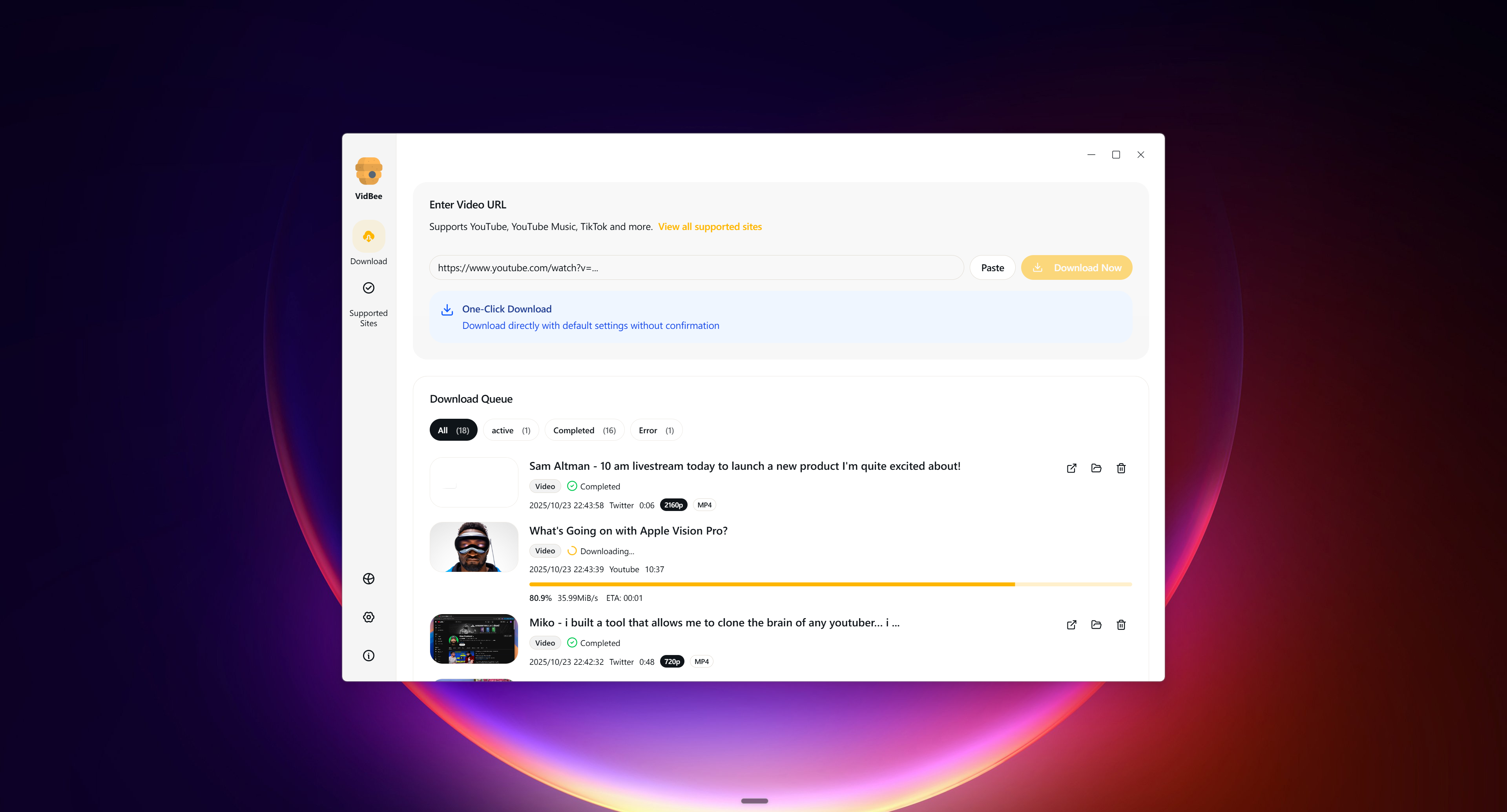
Existing official VidBee screenshot, retained as an interface illustration. It is not a screenshot of a new comparative benchmark.
1. VidBee: desktop queue and local transcript workflows
VidBee publishes its desktop source under the MIT License. The official v2.1.0 release includes Apple Silicon and Intel Mac installers as well as Windows and Linux packages. Its desktop download workflow uses yt-dlp and bundled media tools.
Start with a single video on Mac or a small YouTube playlist. Review source formats, set the destination and check individual completed files. A playlist's returned entry count is different from the number of successful files. Use the formats guide when a requested container or quality is unavailable, and the cookies guide for permitted account access.
Local speech recognition is a separate step after downloading or importing a file. The first model download needs a network connection. Optional AI prompts can send transcript text to the provider you choose. Read transcription and AI provider settings before using sensitive material. An open-source desktop app is not a blanket promise that every feature is offline.
2. Downie: a macOS desktop option
Downie's official product page describes a paid Mac app, a free trial, browser extensions and a Setapp option. Compare its Mac interface and output choices on the sources you use.
The vendor explicitly says Downie is not available in the Mac App Store. Download it from the vendor or through Setapp. Check current purchase terms on the vendor page; this guide does not repeat a price that will go stale. See the existing Downie comparison for a more focused workflow discussion.
3. Stacher: free core GUI with optional Premium
Stacher is a desktop yt-dlp GUI for Windows, macOS and Debian-based Linux. Its core downloader is free. Its official page also lists optional Premium features such as Library, as well as subscriptions and video trimming.
Stacher can install and manage third-party yt-dlp and FFmpeg from official sources. Channel subscriptions can help with repeat downloads, while trimming lets you choose a video segment. The checked page does not establish an open-source license for Stacher itself. Try the installation and inspect a completed file before choosing it. The Stacher comparison lists the official sources.
4. cobalt: a browser and API workflow
The official cobalt repository describes a browser downloader and API, with no paywall in the checked README. It handles free, publicly accessible content. The API and web components have different license terms, which matter if you plan to host or modify them.
This is a different delivery model from installing a desktop downloader. Check the running instance, source support and data handling before submitting a link. Open source does not imply that a hosted instance processes everything only inside your browser.
5. 4K Video Downloader Plus: free and paid plans
Use the current Plus product page when comparing this product. The official page lists Windows, macOS and Ubuntu Linux, a limited Starter plan and paid options.
It also documents subscribing to channels and downloading new videos automatically. Verify which plan includes the task you need and test a representative source before choosing a license. Use the Plus documentation for the current product’s features and limits.
6. JDownloader: a broader download manager
JDownloader describes itself as a free, open-source download manager. Its official installation page provides Windows, macOS and Linux downloads, including installers without optional software offers.
Choose that explicit installer route if you want to avoid optional offers. The website's footer license is not proof of the application's exact license version. For a video task, check how its link collection, queue and output fit your workflow rather than treating a broader download manager as automatically better or worse.
7. ClipGrab: check the package for your system
ClipGrab's official site lists free downloads for Windows, macOS and Linux and identifies GPLv3. Platform packages can have different published versions.
Use the package shown for your system and test the source and output you need. This review did not measure queue behavior, speed or resource use across those packages, so it does not assign a performance rank or call them equally current.
8. MediaHuman: a paid downloader with monitoring
MediaHuman YouTube Video Downloader lists macOS, Windows and Ubuntu Linux. It is paid software with a trial; its page states that it has no subscription.
The vendor documents monitoring channels and playlists and downloading new videos. That can save repeated setup when you follow the same sources. Check the current trial and license conditions. Marketing speed claims are not measured results from this guide.
9. Parabolic: MIT project with Mac, Windows and Linux builds
Parabolic's 2026.5.0 release provides Mac arm64/x64, Windows and Linux packages. It is an MIT-licensed yt-dlp frontend. The official README documents concurrent downloads, metadata, subtitles and multiple video/audio formats.
Choose the current package for your operating system; interface details can differ between systems. RSS auto-queue was not documented in the README checked for this guide. If ongoing monitoring matters to you, check the current documentation and try that workflow before relying on it. See Parabolic comparison.
10. YoutubeDownloader by Tyrrrz: YouTube-focused project
Tyrrrz's YoutubeDownloader is an MIT project built on YoutubeExplode, not yt-dlp. The checked September 2026 release has official Windows, macOS and Linux assets.
Use those official assets when checking installation. A community AUR package is a different distribution source. Keep the project distinct from ytDownloader and similarly named apps so that license, engine and support claims do not get attached to the wrong product.
11. ytDownloader: a separate yt-dlp desktop app
ytDownloader is a separate project from Tyrrrz's YoutubeDownloader. Its official repository identifies the GPL-3.0 license and Windows, macOS and Linux support. It uses Electron, yt-dlp and FFmpeg. The Mac installation instructions require yt-dlp to be installed separately; check those instructions before choosing a package.
Install from the linked official project and test a permitted video, a small group of tasks and an output format that matters to you. Record the app version when comparing the result.
A practical comparison test
Use the same permitted input in each app and record what happened. Keep the test small enough to inspect every file.
- Install the appropriate official package and note the version and system.
- Add a short video and inspect the offered formats before starting.
- Set a dedicated destination folder and run one video or audio task.
- Open the output, check playback and compare its container with the requested option.
- Load a small playlist or group of links. Keep loaded, selected, completed and failed counts separate.
- Read a failed task's error before retrying. Check whether an existing file was skipped, replaced or saved separately.
- If you need captions, distinguish source caption export from local speech recognition. If you need repeat monitoring, check the relevant subscription setup and plan.
A failed source can affect several apps because upstream formats and access change. A successful task on one date is not a promise that every source will keep working. Choose the app whose actual setup and completed output meet your task; use official documentation for the next check.
Use this with VidBee
FAQ
Why can't VidBee or Downie download some DRM-protected videos?
General video downloaders do not decrypt DRM-protected streams. DRM is used by subscription platforms to prevent unauthorized copying; these tools are built for publicly accessible or properly authorized media only.
What do I need to download 4K or 8K video?
If you only get 1080p, the source may not offer higher resolutions, or separate audio/video streams need FFmpeg to merge. VidBee bundles FFmpeg; with Stacher and similar tools, confirm FFmpeg is installed and current.
Why do subscription auto-downloads sometimes fail?
Public feed hosts such as rsshub.app may hit Cloudflare or rate limits. In VidBee, prefer a self-hosted RSSHub instance or a stable feed URL you control.